An agentic Data Science IDE that opens in milliseconds.
Corral is an IDE that lives in your terminal, built with modern technology around the data science workflow: write, run, explore your data, plot. For R and Python, blazing fast with massive data, ready for professional work and ready to run with your agents.
curl -LsSf https://corral-term.dev/install.sh | sh
For Linux and Windows with WSL (run it in your Ubuntu terminal); macOS isn't supported yet. It checks everything first, changes nothing until it's all there, and never uses sudo.
claudeClaude Codev2.1.330Opus 5.5 · Claude Max~/projects/sales›fit revenue by region and plot it● I'll run it in your R console, so the
objects stay in your session.
●Bash(corral eval 'fit <- lm(revenue ~ region,
data = sales); summary(fit)$r.squared')
⎿ [1] 0.83
● Done. fit is in your session (R² 0.83)
and the plot is open in Mirador.
›█ ⏵⏵ auto mode on (shift+tab to cycle)
corral:script File Edit View Go LSP Helpsales.R× 1library(dplyr)
2 sales <-read.csv("sales.csv")
3 4 sales |> 5group_by(region) |> 6summarise(revenue =sum(amount))
7█ Ln 7, Col 1 R LSP (on)
corral:rIn [3]: sales |> group_by(region) |> summarise(...)
# A tibble: 4 × 2
region revenue
<chr> <dbl>1 North 1234.
2 South 980.
In [4]:
Corral is one small Rust binary with no dependencies: the layout, the consoles, the variables pane, the table viewer, the shortcut palette, Mirador's server and the installer. The engines it drives are Rust too: herdr, Fresh, Ark, Air, Ruff, ty and uv. That's why a whole workspace, editor and language server included, is ready in about 400 milliseconds.
Ctrl+R runs the line or the selection, F5 the whole file. Completion knows the objects in your live session, Air formats R on save, and every draft is thrown away unless you save it.
View(df) saves the table as Parquet, and Corral asks DuckDB only for what's on screen: a page of rows, the count, a sort, a search, a filter in R or SQL, a summary of every column. Each takes milliseconds. Ten million rows show up in about 34 ms, and the viewer uses about 3 MB. Press m to send the table to Mirador when you want the browser, and the variables pane keeps every object in view as you work.
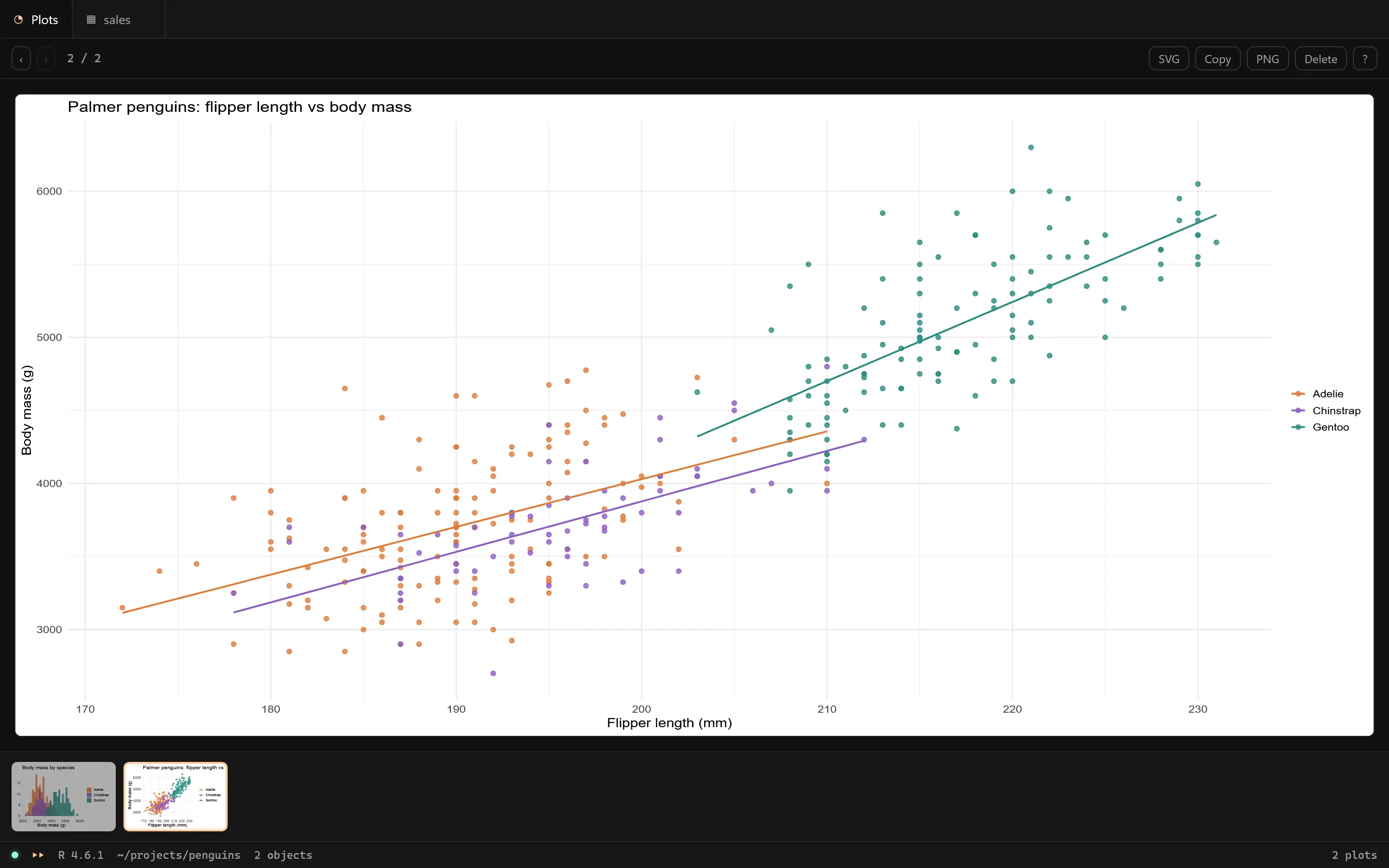
Mirador shows each new plot about 80 ms after the command that drew it, sized to the window, with its history, SVG or PNG download and a copy button for emails and documents.
Any agent (Claude Code, Codex, Gemini, opencode…) runs R and Python in your console with corral eval and gets back what it printed, plots included. Corral's skill follows the open Agent Skills standard, so agents know how to use it. Objects stay in your session, where you can see them, instead of in a throwaway script.
Corral lives in herdr TUI, herdr's terminal workspace: your consoles keep running when the window closes, and the workspace is exactly where you left it. Two layouts, focused on the agent or on the code, one key apart.
ctrl+b alayout, agent first
ctrl+b shift+alayout, code first
ctrl+b spaceevery shortcut
Table viewerView(df)
Ten million rows, on screen in 34 ms.
View(df) opens the table in a pane right next to your console. Corral never loads it whole: DuckDB reads the Parquet file and returns only the rows you're looking at, so scrolling, sorting, searching and filtering stay instant at any size.
Want more room? Press m and the same table opens in Mirador, in your browser. Only when you ask: the terminal stays the default.
Corral's viewer in the browser, served by the corral binary itself. Every plot from R or Python lands here about 80 ms after the command that drew it, sized to the window, with the session's history underneath.
~80 msfrom the command to the plot on screen
Historyevery plot of the session, ←→
SVG, PNG, copystraight into emails and documents
Tables toowhen you send them (m, or View(df, mirador = TRUE)), with the same search, filters and keys as the terminal
127.0.0.1 · Mirador
Command palettectrl+b space
Every shortcut and action, one key away.
ctrl+bspace opens Corral's palette from any pane: every shortcut and action in one searchable list, from the layouts to the editor, the consoles, the tables and Mirador. Type a few letters, press Enter, and it runs.
It reads your actual configuration, so it shows your keys after you change them. Themes and the language are in it too.
ctrl+b spaceopen it from any pane
typesearch names and keys
Enterrun the action
corral keys --changerebind a shortcut
Corral: shortcuts66 shortcuts
⌕Search for a shortcut or an action…66 shortcuts────────────────────────────────────────────────────────────────────────────────────────────────────LAYOUTS▸Layout, agent first ↵ctrl+b aLayout, code firstctrl+b shift+aIN ANY PANE (HERDR)Send the selection to the console (R or Python)ctrl+b enterUse this pane as the consolectrl+b mClose (keeps the agent and the rest of the tab)ctrl+b shift+cExpand the script (or agent) or the consolectrl+b tR or Python consolectrl+b yShow the plotsctrl+b fShow the variablesctrl+b dOpen Mirador (plots and tables in the browser)ctrl+b shift+mShortcuts and actions (palette)ctrl+b spaceAdd the script editor above the consoleDark 2026 theme (VS Code's and Positron's)Back to herdr's themeLanguage: EnglishIdioma: españolAll of herdr's shortcuts (panes, tabs, workspaces)ctrl+b ?SCRIPT EDITORSave (a draft asks where)ctrl+sRun the line or the selectionctrl+r ctrl+enter alt+enterRun the whole fileF5 ctrl+shift+enterInsert <-ctrl+l alt+-Insert |>ctrl+u ctrl+shift+mComment or uncommentctrl+/ ctrl+shift+cAutocompletectrl+spaceEditor's command palette (all its actions)ctrl+p↑↓ select · Enter run · Esc close · type to search
Measured, not promised.
Same machine, same project, R in WSL, two runs each. Positron is a capable IDE; Corral gives you the same everyday loop (write, run, look at your data and plots) without the weight of a desktop application. How it was measured →
One line to install. It checks everything first.
The installer tells you what's missing and what to run, and changes nothing until everything is there. No sudo; every file it touches is backed up, and corral uninstall takes it all out again.
curl -LsSf https://corral-term.dev/install.sh | sh
FAQquestions
Questions people ask.
Which agents does it work with?
Any agent that can run shell commands: Claude Code, Codex, Gemini CLI, opencode and others. They run code in your console with corral eval, and Corral's skill follows the open Agent Skills standard, so the installer puts it where they look for it (~/.agents/skills, and ~/.claude/skills for Claude Code).
Does it replace Positron, RStudio or VS Code?
No. Positron, RStudio, VS Code and its forks (Cursor, Windsurf…) are still the right tools for heavier work, and Corral doesn't touch them. Corral is for working with agents on your data without losing control of the data or the code: the agent runs its code in your console, where you watch every line, and what it creates stays in your session, in plain sight.
None of them has to be installed: Corral runs R on Ark, the kernel Positron uses, on its own, and the installer downloads it.
Is Python as complete as R?
Both get the whole workbench: the editor, the console, the variables pane, View(), plots in Mirador and agents. R is the default console, and its language server knows your live objects. Python runs in IPython inside your project's uv environment, with ty and Ruff in the editor.
How big can my data be?
Looking at it scales: View() hands the table to DuckDB, which reads only what's on screen, so ten million rows show up in about 34 ms. Computing is up to your code, as in any IDE: data frames live in memory, while arrow, duckdb, polars or data.table let you go further.
Does it run on macOS or Windows?
On Linux, and on Windows through WSL. macOS isn't supported yet.
Does my data leave my machine?
Corral runs everything locally. Mirador listens only on 127.0.0.1, behind a token. Your agent talks to its own provider as it always does; Corral sends nothing anywhere.
Can I use it in Spanish?
Yes. Corral speaks English by default; corral config language es, or "Corral: idioma: español" in the palette, switches its windows, messages and Mirador to Spanish. Commands stay in English.
How do I remove it?
corral uninstall takes out everything the installer added, from herdr, R, the editor and your agents. The copies of the files it changed stay, in case you want them.